
Adra · Label reading
Point the camera at a nutrition label.
Adra reads the table printed on the package and turns it into structured macros. For packaged food, that table is the most exact source available, and copying it by hand is the tedious part. Adra does the reading on your phone, with no typing and no cloud.
Example
A Swiss fish pack, printed in four languages at once. Here is what the reader takes from the photo.
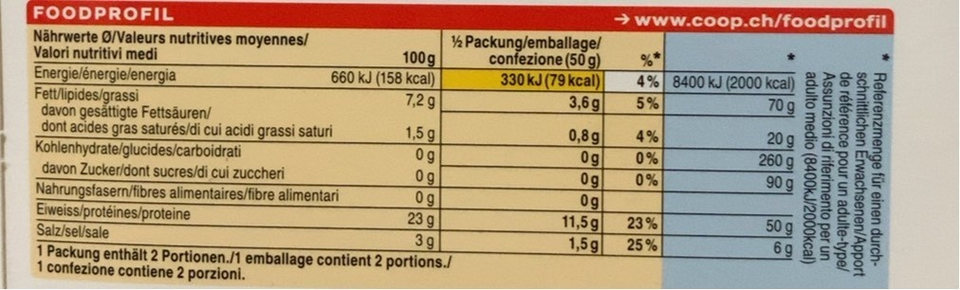
Label photo from the Open Food Facts nutrient-detection-layout benchmark set (CC BY-SA 3.0).
| Energy | Protein | Carbs | Fat | Basis | Serving |
|---|---|---|---|---|---|
| 158 kcal | 23 g | 0 g | 7.2 g | per 100 g | 50 g |
The kJ and kcal pair is read as one value. The 8400 kJ adult reference column is ignored.
Pairs, columns, reference values, and two bases at once. Energy, protein, carbs, and fat all come out of it. Everything is understood before you confirm anything.
Tested on up to 300 labels
The reader is measured, not asserted. It goes through a benchmark of up to 300 real label photos, drawn from the Open Food Facts nutrition-table test split plus US-format labels and close-up photos of packaged food. Every field is scored against the values printed on the label, so the numbers on this page describe what the reader actually did rather than what it was designed to do.
-
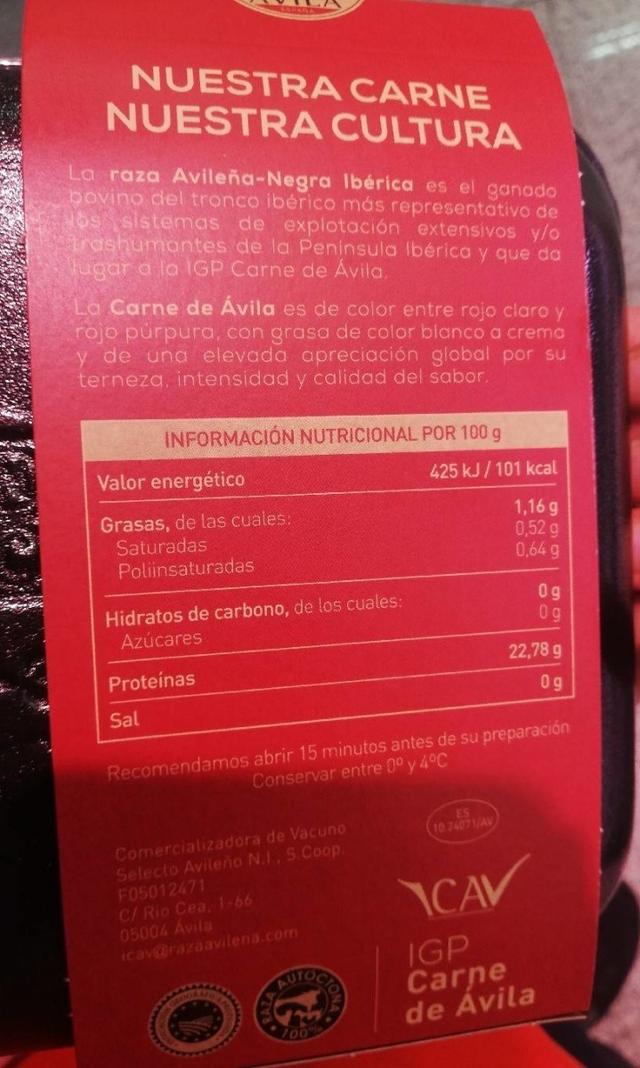
Spanish. Energy: 425 kJ and 101 kcal, read as 101. -
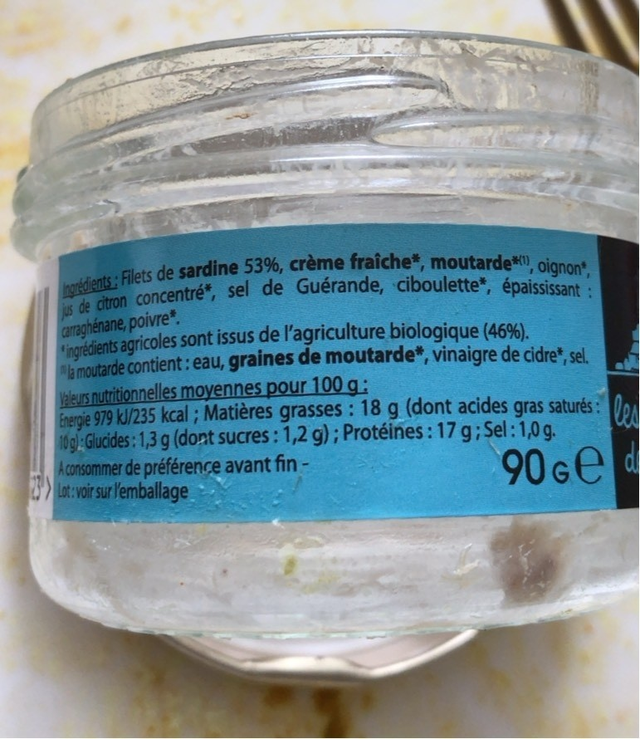
French. 235 kcal, with all four macros correct on the device. -
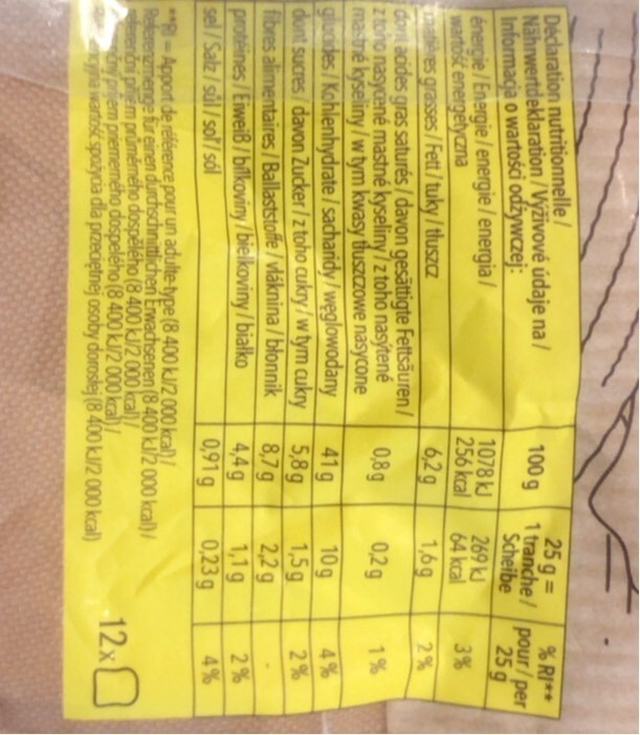
Rotated 90 degrees. Read anyway: 256 kcal.
All label photos from the Open Food Facts nutrient-detection-layout benchmark set (CC BY-SA 3.0).
| Photo | Energy (kcal) | Protein (g) | Carbs (g) | Fat (g) |
|---|---|---|---|---|
| Swiss fish pack, four languages | 158 | 23 | 0 | 7.2 |
| Spanish fish fillets | 101 | missed* | 0 | 1.16 |
| French rillettes | 235 | 17 | 1.3 | 18 |
| Gratin, rotated 90 degrees | 256 | 4.4 | 41 | 6.2 |
* The protein line on the Spanish label is the one macro value missed across these four photos.
Labels vary, and yours may still surprise the reader. That is why it always shows its numbers before anything is saved: you see the extraction first, you catch what it missed, and only then does the meal take the values.
What it reads
A nutrition label is a small, dense document, and the reader treats it as one. It pulls the fields that matter for tracking and leaves the rest where it found them.
- Energy in kcal, fat and saturated fat, carbs and sugars, protein, fiber, and sodium.
- Per 100 g, per serving, or both, when the pack prints both bases.
- The values land in your meal as that ingredient's nutrition, so setting the portion carries the macros with it.
- German labels work too, words like Brennwert and Kohlenhydrate included, and more than a dozen languages in total.
Many languages, many layouts
Labels are not standardized across countries, and the same nutrient can wear a different word on every shelf. Rather than learn each country's format, Adra reads the patterns that repeat everywhere and matches field names in more than a dozen languages.
Brennwert     · Energie              · Energy     → calories
Fett          · matières grasses                  → fat
Kohlenhydrate · glucides                          → carbs
Eiweiß        · protéines            · Protein    → protein
German, English, French, Spanish, Italian, Portuguese, Dutch, Polish, and other Latin-script labels read directly, because numbers are numbers in every language. Other script families are a planned expansion, not a promise.
Layouts that show up in the wild, all handled:
- Per 100 g tables, per serving tables, and packs that print both bases.
- US-style Nutrition Facts panels with a percent-daily-value column.
- Rotated and tilted photos, including full 90-degree turns.
- Reference columns like 8400 kJ and 2000 kcal, recognized and left out.
- Bilingual packaging, where one field appears twice or three times.
- Photos with a barcode in frame. The text is still read.
How one label works
-
Take a photo.
Camera or gallery, straight or tilted. The reader is built for the angles a hand actually holds a phone at.
-
Adra finds the text.
On-device text recognition locates the words and their positions on the package, without sending the photo anywhere.
-
It rebuilds the table.
The words become rows and columns the way a person would read them, with the reference column set aside.
-
You confirm.
The values are shown for review first, and only then do they land in your meal.
What makes it good
-
Rotation handled.
Tilted and rotated photos are straightened before reading, including full 90-degree turns. Vertical text does not scare it.
-
The fine print knows its place.
The 8400 kJ reference column that packages print for adult intake is recognized and excluded automatically, so it never lands in your macros.
-
Both number styles.
Energy pairs like 660 kJ (158 kcal) are understood in one step, whether they share a cell or sit side by side.
-
Two bases at once.
Packs that print per 100 g and per pack are read as both, with the serving grams taken from the pack itself rather than assumed.
-
More than a dozen languages.
Field names are matched in more than a dozen languages, so a German Brennwert and a French énergie resolve to the same field.
Honest limits
- A blurry or badly angled photo can lose a field, and crowded multi-column labels are the hardest case. Sodium is the field most likely to slip.
- Energy is stored in kcal, so the app keeps one unit across every label.
- It reads what is printed. It does not guess, and it never fills a field it could not find.
Label logging is part of the free version, like every other way of logging, with history beyond today as the only paid part. The pricing model explains what that means.
FAQ
Does the label reader need the internet?
No. Detection and reading run on the phone. The models ship inside the app.
Which languages does the label reader understand?
Label field names are recognized in more than a dozen languages, including German, English, French, Spanish, Italian, Portuguese, and Dutch. Latin-script labels read directly.
How accurate is the label reader?
The reader is benchmarked against up to 300 real label photos. Across the four examples on this page, energy was right every time and the full macro set came back for three of four. On the device circuit, calories were right on 3 of 3 labels, and one full label logged with all four macros correct. Hard photos and dense layouts can still trip a field, so values are always shown for confirmation first.